Recently in Computers Category
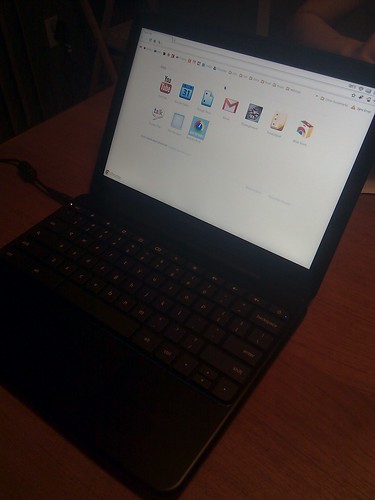
I just received my Samsung Series 5 Chromebook. First impressions... There's going to be a little bit of getting used to the lack of desktop. It's basically like Google Chrome, the browser, but taking the entire space of the computer. Aesthetically, there are added icons at the top right of the Chrome for time, wifi signal, battery and other Chrome instances. It's fast, but there's going to be some learning curve for doing stuff like listening to music, editing videos and opening terminals...
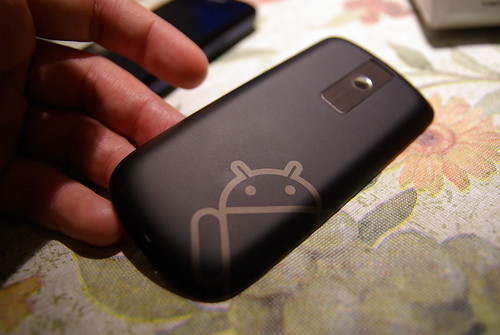
Android Dev Phone 2 cover. The AD2 is also known as the Google Ion, a software remix of the HTC Magic. Was handed out to Google I/O 2009 attendees and made available to other developers in November 2009.
When Google's new "superphone" Nexus One was released yesterday, it was made available for online orders shipping to four places in the world: the US, the UK, Singapore and Hong Kong.
In Canada, I was paying CA$40/mo for high-speed (7mbps) Internet over fixed-line, on top of a mobile phone service (no data) that costs me CA$35/mo.
Hong Kong is a city where you can get pay-as-you-go SIM cards for your GSM phone with a company like China Mobile HK for just HK$100 (CA$13.50) and get charge HK$0.10 (just above one cent) per local minute, and HK$0.25 (about three Canadian cents) per minute for Overseas calls to places like Canada, the US and the UK. If you sign up for a monthly postpaid plan (need a HK ID, or pay a ~HK$3000 deposit), you can get ridiculously cheap plans. My family and friends here constantly tell me about plans going for HK$50-100/mo. (CA$6-15), giving them access to stuff like 1000 minutes, up to a practically unlimited amount of minutes to call to Canada.
But one of the reason -- I think -- making Hong Kong such an appealing market for Google to roll out its version of the future (in the cloud) is also the cheap price of mobile broadband.
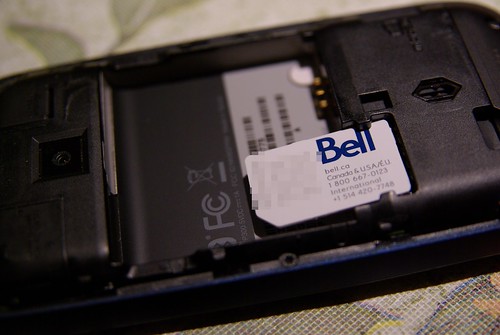
Android Dev Phone 2 with a SIM card from Bell (Canada).
Back in Canada, all major phone companies offer mobile Internet, but always with some sort of limitation on the bandwidth. Bell released its new HSPA+ network in Fall 2009, with potential speeds up to 21mbps (that's 3 times as fast as the typical high-speed Internet by fixed phone line), but typical speeds going much lower, probably running at 3-7mbps (just speculating). The price? A regular 500Mb data plan for iPhone goes for CA$50. That's not a lot of data, if you consider that each video watched on YouTube can be 5-10Mb. Other Bell data plans range from CA$60-100 for bandwidths of 1-3Gb.
Now in Hong Kong, I am also a personal consumer (I don't get any phone, let alone phone plan from any company that would employ me), and recently switched from a prepaid plan with China Mobile HK (the lowest of the low in HK, but a v. good short term prepaid option) to a postpaid data plan with SmarTone-Vodafone, probably the company with the next to the best (CSL/Telstra) mobile network coverage and quality in Hong Kong. Now this plan sets me back HK$250 (all fees included) and gives me unlimited data (and an insane to Canadians, but expected by Hongkongers, amount of minutes) at typical speeds of around 2-3mbps.
Now, bear in mind that in this market, HK$50 monthly plans are the norm for the masses. But with a comparable cost of living to Canada (3/4 of Canada in daily expenses), this means that with tethering (using your phone as a modem for your computer) for an extra HK$50, for a total of HK$300 (or CA$40), people in Hong Kong can drop their fixed Internet line altogether, and like to paraphrase Google, merge their phone with the Web for ridiculous prices for North American wallets.
Unlimited high-speed data plans are sold by 3 or 4 companies in Hong Kong, with prices varying around HK$250/mo, the price at SmarTone-Vodafone with a 18-month contract. The selling point, at least for me, was that you can break your contract at any point for just a HK$500 (CA$66) fee.
Is that the sign that mobile phone contracts are starting to become a thing of the past? The plan is again very poorly advertised by SmarTone, because subsidized phones are still the way. This HK$250 monthly contract is only available if you bring your own unlocked smartphone, very common in Hong Kong... and now available directly from Google at US$530, or US$580 (HK$4500) when counting an AC adapter and international shipping to Hong Kong.
If your needs don't justify such expenses, Hong Kong is probably one of the easiest places in the world to find second-hand phones of reliable quality (this is not the jungle of Mainland China). One of my friends went to Mong Kok and bought a "used" HTC Tattoo (came out just in October 2009), HTC's budget-range smartphone that is running Android 1.6 for only HK$1000-something (around CA$200 if I remember correctly).
250/mo becomes 3000/yr (CA$400), for all your Internet needs. When I'm going to read these numbers in 5 years, I'm probably going to be as amazed as what a regular laptop or desktop computer used to cost 5 years ago...

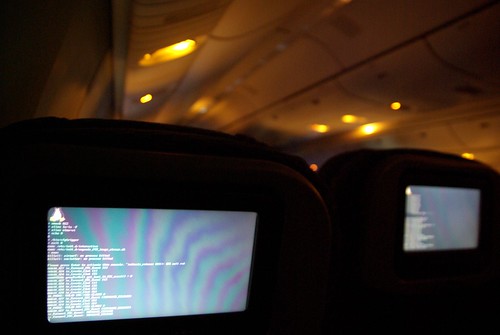
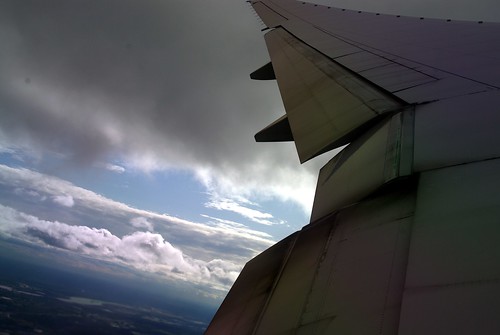
It can be a little unsettling when you see rows of text scrolling down the screen in front of you when sitting in an airplane. That happened twice during my flight to Hong Kong yesterday, as the captain needed to reboot the server running the touch-screen system controlling on-board entertainment and flight status.
I'm not so surprised that they use Linux. It's pretty nice to see the text cascading across the screen -- I'm getting perhaps a strong sense of familiarity.
I just moved in to my new apartment last weekend. I got a nice bed at Ikea, and some cheap furniture from Wal-Mart. I now need a sofa and maybe a computer desk.
Speaking of computer, I am experiencing the terrible delays, innuendos of signing up to a high-speed Internet service. I chose Bell Sympatico (total performance, at 7 Mbit/s), of course not because of their recent rebranding. I signed up to get my service activated on August 16th (five days, from Aug 11, the day I placed my order on Bell's website). Then, come the 16th, my phone is active, but I don't get my modem! What happened to it? I call 310-BELL, and 310-SURF, don't get what has happened. The lady was just saying that it would be delivered again.
On Monday night, I don't find the modem in my mail, throw a tantrum on the customers' service line. The next morning (this morning), I call the high-speed Internet hotline, and find out that Purolator tried to deliver, but didn't have a buzz code (I did not provide them with one, since I did not know it!), so kept it in their depot in Ville St-Pierre without even leaving a paper saying that they came by! So, I go all the way to Ville St-Pierre (320 Norman), get the modem. Tonight, I try it, and find out that the phone line's "capacity to do PPPOE" is somehow not active on my side...
But my account is definitely active, because I am using my dial-up access! So there I am, using my phone modem for the first time. Can you imagine that? Gmail takes time to load, and I need to use its HTML-only version... Even a terminal over SSH is painful.
Now, the Bell technician is supposed to come "within the next three days". Was my phone line mis-activated? Did rats gnaw on a part of the phone cable that was critical for my Internet? To be continued...
Update: They just forgot to activate my line... I'm now back to the 21st century.
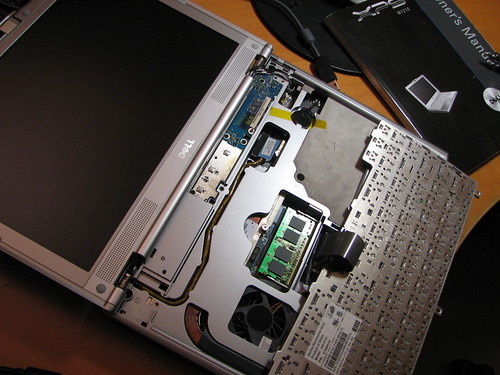
The first memory slot is easily accessible from a small door on the bottom face of the laptop. If you are upgrading your memory, you will need to upgrade both modules in order to preserve your dual-channel configuration.The Owner's Manual that came with the notebook does not even mention where to find the second memory slot. After finding a PC World review of the XPS m1210, we found out that the elusive second RAM slot is located under the keyboard...
For the XPS m1210, you will be looking for PC2-5300 667MHz DDR2 200-pin SO-DIMM RAM. The cheapest RAM today (July 2007) costs around 120CAD for 2 x 1Gb. If you don't want to void your warranty, then the kind that Dell sells (actually from Kingston - even if the RAM that originally came with my notebook was from Korean manufacturer Hynix) is 90CAD for each slab of 1Gb. Prices don't include shipping, nor taxes, but your local computer store should have this item and save you the former.
After my Linux/XP install last week, I managed to throw in Solaris into the blend. It wasn't simple, because a Solaris install had to be on a primary partition (you are limited to four with a standard msdos partition table) and it also had the side effect of rearranging your partition numbering.
On my first install, I decided to scrap a previous Ubuntu install, only to find out that Solaris overwrote my MBR, which I couldn't then restore to the GRUB boot loader.
What I did was to start over, starting with Solaris. WinXP is on a separate SATA hard drive, so I did not have to deal with it. The Solaris installer doesn't allow you to create Linux partitions. When I got to partitioning the drives, I created three empty DOS primary partitions (approx sizes -> 200Mb + 500Mb + 100Gb), plus the Solaris partition (20Gb). I let the installer do its deed, rebooted to check whether it was fine.
After this, I installed my four Linux distributions, accordingly to the last manipulation. With Ubuntu, the first Linux distribution installation I did, I reinitialized the partitions to Linux using the "cfdisk" command. I went through a normal Ubuntu installation, which also allowed me to repartition the largest of the Linux partitions in four equal parts of 20Gb (for each distro). I installed the other distros, making sure that /boot and /home were not rewriten.
When I finished installing the Linux distros, and rebooted the second time from the Solaris system, my GRUB boot loader had disappeared! I took out an Ubuntu CD, and repaired the MBR by mounting /dev/hda1 (/boot) to /mnt/boot, and then issuing "grub-install --root-directory=/mnt /dev/hda". Here is a copy of my menu.lst.
In Solaris, support for my network interface did not came "out of the box". It is a network adapter on an ASUS K8N-E Deluxe, which has a nforce3 chipset. I downloaded the free nfo driver, and burned the tar.gz on a CD. I followed the instructions in the readme, using amd64 as my architecture, and suncc as the compiler. For the network interface configuration, I followed this how-to for setting up a Solaris DHCP client. The driver loaded, but I did not have any connectivity. After changing a few things (by not configuring the driver under /kernel/drv/nfo.conf, and removing a few parameters to get from the dhcp server - configured on the last line of /etc/default/dhcpagent), I was able to configure my interface and access the external world.
After using Solaris for a while, I find its desktop environment (it is definitely gnome, or rebranded/modified gnome) to be slow to react. Maybe it's the graphics driver, as it isn't fglrx (with dual screen setup, like on the Linux installs). I've read reports that it is possible to have dual screens with the "ati" free driver (ATI doesn't have a release of its proprietary driver "fglrx", but I think it might be possible to make it work on Solaris if it does for Linux?), but I'm not planning to do it.
This is the output of my df -Th:
Filesystem    Type    Size  Used Avail Use% Mounted on

/dev/sda2     ext3     20G  2.8G   16G  15% /

/dev/sda1     ext2     96M  8.4M   83M  10% /boot

/dev/sda3     ntfs     50G  7.9G   43G  16% /media/sda3

/dev/sda7     vfat    4.7G  312K  4.7G   1% /media/sda7

/dev/sda6     vfat     35G  142M   34G   1% /windows
I always prefer to install the Windows partition before the Linux one, because Windows will overwrite your MBR and call the Windows boot loader that doesn't detect any non-Windows OS present. Besides, the Linux one (GRUB) is superior, per its flexibility and customizability.
But before starting installing the OSes, one must partition. What I did was first to boot with my Ubuntu CD (6.10 Egdy Eft), and use gparted to partition my disks. Perhaps I could've done it otherwise, but I had time and still went through the whole installation (which took perhaps 10 minutes. sda1 to 4 are primary partitions, while the three others were logical ones (with swap memory somewhere in there).
Out of a total space of 120Gb, I chose to give Ubuntu only 20Gb, and Windows, 50Gb. The remaining space is of fat32 filesystem and used as storage space accessible in read and write by both OS (35Gb - sda6) and for built-in "media center" features. Before partitioning, on top of the main preinstalled Windows Media Center, there were two smaller partitions of 2 and 4Gb respectively. One was seemingly for Dell's Media Center implementation, and the other is some sort of backup WinXP.
After partitioning, I rebooted with the Windows Media Center CD that came with it.
I run a partition of Linux/Ubuntu, and of Windows XP at home. Depending of how I'm feeling, I'd use one or the other. More than anything, if I feel "lazy" I go for the latter. :P But in fact, little advanced computer skills are required to use a typical modern graphical Linux install, especially Ubuntu.
In any case, I don't know for Windows Vista, but as far as WinXP is concerned, it is totally replaceable in a work context (edit: erm, what am I saying?). The multimedia support is the only point against Ubuntu, as far as I'm concerned. I can't play Flash stuff (but the developer's blog states that a plugin of 9.0 for Linux 64-bit is being developed), and have lots of inconsistent trouble with multimedia streams... I suspect that it is the predominance of non-free formats in the digital world, more than some sort of negligence. I am using mplayer as my browser multimedia plugin, and officially, Ubuntu supports gstreamer. It's not that I haven't tried gstreamer, but it just wouldn't run half the things I try to play on it (with all possible non-bad plugin sets installed).
(Edit: for the Vista bit, what I mean is that there's nothing fancy to the WinXP interface that can't already be found in Linux/Ubuntu... To replace Mac OS X's interface is still unnatainable, by all means, and Vista is apparently going to be gorgeous by today's WinXP standards, so I don't know. But if you need a computer that "works" and does the now-standard user interface stuff, then Linux/Ubuntu with Gnome is good-enough.)
Was playing with my newest Ubuntu install and found in the 'Examples' directory, a recording of Alice in Wonderland's first chapter in spoken form, coming from LibriVox, a free online collection of audiobooks from the public domain and recorded by volunteers. You will find works from Lao-Tsu's Tao Te King to Austen's Pride and Prejudice, poetry (Shakespeare) and other miscellaneous (US Declaration of Independence).
So I took the laptop my brother was using for school, formatted it, and reinstalled it to my taste. It's a machine he got over the Holidays in 2000-01, thus an antiquity of a few hundreds mHz and just 192 Mb of RAM. Of the 20Gb HD, I made a 10Gb WinXP partition, in case, but the Linux partition, an Ubuntu install for regular 32-bit PCs works just as well - there's a working Flash, and network/sound work like a charm, but I am guessing that the multimedia might be choppier than on WinXP.